IP地址分内网的与外网的,通过下面的VC代码可以获取本机IP(如果连接路由器,会得到两个IP地址,一个内网(192.168.1.*)的,一个外网的)。 [crayon-69d780f37bb13516298543/]
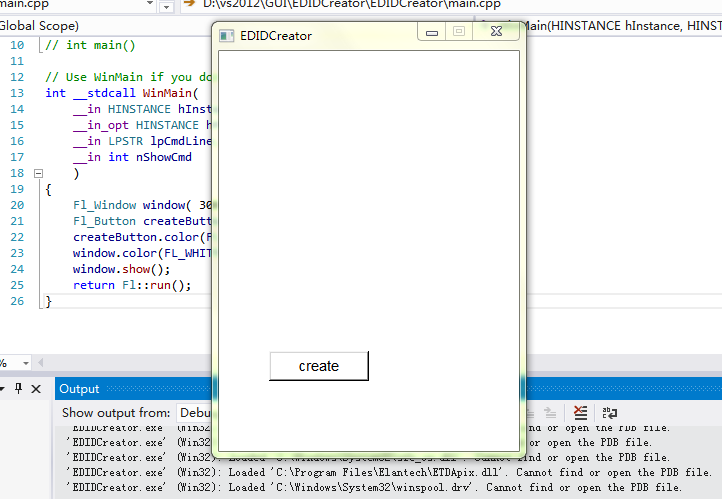
最近在写一些小工具,打算用一个体积小,跨平台,不要求界面美观的GUI库,QT太庞大,后来在stackoverflow找到了FLTK这个库,刚好满足我的要求,话说这个GUI库写的界面确实很丑。从FLTK官网下载了1.3.3的代码,解压,打开IDE文件夹里的VisualC2010文件夹中的fltk.sln编译即可得到需要的lib文件(我用的是vs2012),没有什么难度,不明白的可以参考http://www.c-jump.com/bcc/common/Talk2/Cxx/FltkInstallVC/FltkInstallVC.html。 构建我的第一个FLTK程序时遇到了一个问题,程序报如下错误: [crayon-69d780f385d8f413954492/] 我想我用的是VS编译的,是windows系统啊,又不是linux系统,怎么会报这个错误,而且要用的头文件以及.lib文件我都包含了。后来上谷歌找了一段时间,在一个论坛找到了答案(虽然作者没有明确提出解决方法,但我明白了作者意思),把FL文件夹里的math.h文件移除就可以,重新编译就不会报这个错误了,这解决方法也太暴力了吧。 虽然FLTK写出来的界面很丑,不过对于小工具而言可以了,只有几百Kb的程序,能用就行,只需要简单的几个控件即可。

下面这个函数实现了让Windows系统重启的功能,首先是提升权限,然后主要是函数ExitWindowsEx的使用: [crayon-69d780f3866a0790958820/] ExitWindowsEx函数使用说明参考:https://msdn.microsoft.com/en-us/library/windows/desktop/aa376868(v=vs.85).aspx
Windows系统下通过winapi获取当前显示器屏幕分辨率VC示例代码: [crayon-69d780f386f3d466388115/]
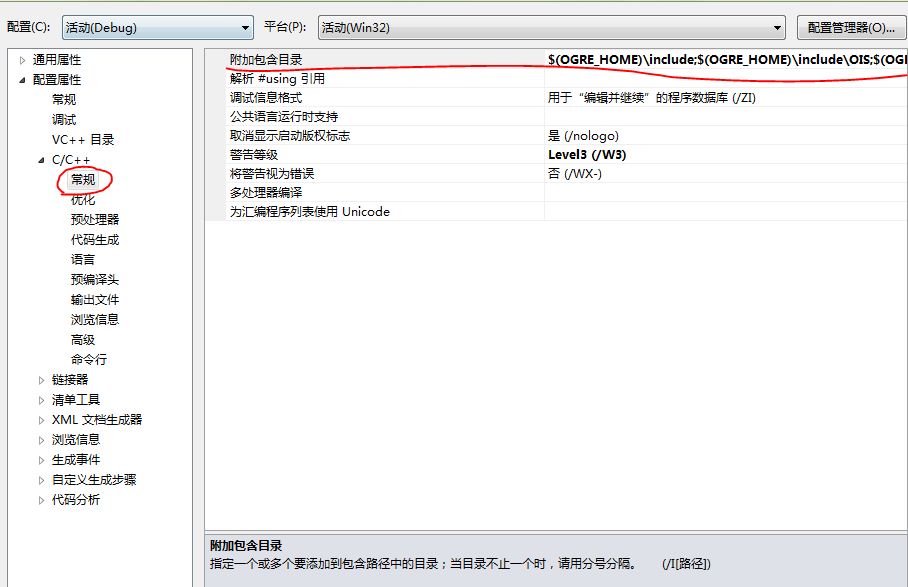
没有声音会觉得很乏味,不够生动形象,更何况是一个3D漫游系统呢。所以今天给自己的系统加入了声音效果。由于Ogre只是个图像渲染引擎,加入声音的话得加入第三方库,对比了一些音频库,最后决定使用irrKlang这个音频库,跨平台,支持3D音效,使用起来也不是太难。 安装配置 首先到
最近在学Qt5,遇到了许多问题,这篇文章主要对自己遇到的一些问题进行总结。 1.编译最简单的HelloWorld时 [crayon-69d780f388827211111511/] 系统提示:QApplication: no such file or directory 解决方法:这是因为Qt5的qapplication在QtWidgets模块里,和Qt4不一样,Qt4的qapplication在QtGui模块里,在pro里添加一行 [crayon-69d780f388830547777037/] 即可。
The QtWebKit module provides a web browser engine as well as classes to render and interact with web content. QtWebKit模块提供了一个web浏览器引擎同时也提供了能够渲染与作用于网页内容的类。 QtWebKit provides a Web browser engine that makes it easy to embed content from the World Wide Web into your Qt application. At the same time Web content can be enhanced with native controls. QtWebKit提供了一个很容易吧万维网内容嵌入QT应用的浏览器引擎。web内容也很容易被嵌入到本地控件中。 QtWebKit provides facilities for rendering of HyperText Markup Language (HTML), Extensible HyperText Markup Language (XHTML) and Scalable Vector Graphics (SVG) documents, styled using Cascading Style Sheets (CSS) and scripted with JavaScript. QtWebkit能够渲染HTMl语言,也可渲染XHTML与SVG,实验css设计界面与Javascript进行脚本编程。 A bridge between the JavaScript execution environment and the Qt object model makes it possible for custom QObjects to be scripted. For detailed documentation see The QtWebkit Bridge. Integration with the Qt networking module enables Web pages to be transparently loaded from Web servers, the local file system or even the Qt resource system. In addition to providing pure rendering features, HTML documents can be made fully editable to the user through the use of the contenteditable attribute on HTML elements. QtWebKit has been enhanced to become more attractive on the mobile front as well. For more information see QtWebKit Goes Mobile. QtWebKit is based on the Open Source WebKit engine. More information about WebKit itself can be found on the WebKit Open Source Project Web site. Including In Your Project To include the definitions of the module's classes, use the following directive: [crayon-69d780f3890a1467108693/] To link against the module, add this line to your qmake .pro file: [crayon-69d780f3890aa531492637/] Notes Note: Building the QtWebKit module with debugging symbols is problematic on many platforms due…
Recent Comments

Addiea9 Published at 2 days ago(04 04202643001 08 08am26)

snail Published at 2 weeks ago(03 03202633105 27 27pm26)

dongxuh Published at 9 months ago(07 07202573103 27 27pm25)

南南 Published at 9 months ago(07 07202573103 15 15pm25)

Jeff Published at 11 months ago(05 05202553105 15 15pm25)