最近在creatScene方法中一直实现不了天空,编写了天空代码,可是看过去天还是黑色的,也就是背景颜色,设置了好多种天空类型都是一样结果,最后从谷歌搜索到的某个论坛中看到了解决方法,是我的clipdistance没设置正确,原来为 [crayon-69d928c29d66f429575035/] 后来改为 [crayon-69d928c29d67c461367351/] 就正常了,这是因为天空太高,相机的FarClipDistance得设置的远一些,这样才能看到天空。
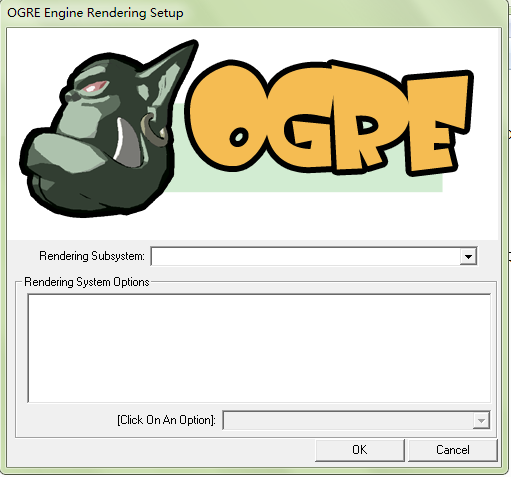
为了进一步学习,今天下了个Advanced Ogre Framework代码,而不用以前的baseapplication框架,代码在release下顺利运行,然而在debug时却出现了下面这种情况 也就是配置对话框是空白的,不能进行配置,导致无法进一步运行,想了好久,也不知道为什么,看了下plugins_d.cfg也没发现什么问题,这时候也只能靠谷歌了,在ogre config dialog empty? (solved)这里找到了答案,是这样回答的: 也就是在release模式下配置对话框正常,debug模式下不正常,这是因为在debug文件中,插件配置文件名为plugins_d.cfg,而不是 plugins.cfg,Ogre在项目的bin与OGRE_HOME debug文件下都需要plugins.cfg,复制plugins_d.cfg重命名为plugins.cfg就可以了。 按此解决方法,我在sdk/bin/debug下面复制重命名了一个plugins.cfg,然后点击exe文件,对话框正常了,可以进行配置了。
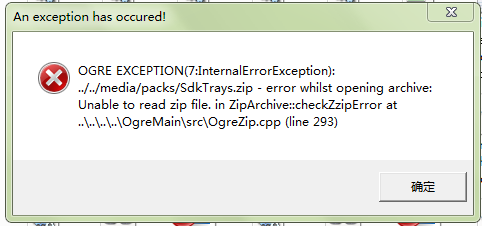
由于毕设做的是基于Ogre的虚拟漫游系统,所以最近在很努力地学习Ogre知识。 刚才使用 Ogre AppWizard创建Ogre向导后,在vs2010下可以编译运行,但是在项目debug文件下运行时提示缺少.dll文件,去Ogre wiki上查了下,是这样说的: Missing a Configuration File or DLLs If you try to launch your freshly built application but the program complains of missing DLLs or configuration files (*.cfg), then you probably did not copy them over from the OgreSDK folder. In Visual Studios, when you build your application in release mode, it puts the release executable in the [ProjectFolder]\bin\release folder, and the debug executable in the [ProjectFolder]\bin\debug folder. You must copy all the ".dll" and ".cfg" files over from the OgreSDK into the appropriate folders. That is, copy the files from [OgreSDK]\bin\release to [ProjectFolder]\bin\release and [OgreSDK]\bin\debug to [ProjectFolder]\bin\debug. You will also need to edit the resources.cfg file to point at the correct paths. See the next section for more information on this. 也就是需要把[OgreSDK]\bin\debug下的全部文件都要拷贝到项目文件夹的debug下面,我按这说了,拷了过去,点击.exe文件,可是却提示:Unable to read zip file 再去查了下wiki,这样说的: Make sure you have a plugins.cfg and a resources.cfg in the same directory as the executable. Plugins.cfg tells OGRE which rendering libraries are available (Direct3D9, OpenGL, etc). Resources.cfg is used by the ExampleApplication and specifies paths to textures, meshes and scripts. Both are text files, so edit them and make sure the paths are correct. Otherwise your OGRE setup dialog box may not have any rendering libraries in it, or you may receive an error on your screen or in Ogre.log that looks something like this: Description: ../../Media/packs/OgreCore.zip - error whilst opening archive: Unable to read zip file 也就是需要把Resources.cfg中的路径配置改了,我把media文件夹都拷贝过来,media文件夹位置:D:\vs 2010\Projects\media,项目debug位置:D:\vs 2010\Projects\OgreApp4\OgreApp4\bin\Debug,设置好media文件夹相对于可执行文件的相对路径, 把Resources.cfg中media路径都改了,如下所示: [crayon-69d928c29eb64943231934/] 再次运行,可以正常运行了,错误也都没了,好吧,第一个简单的Ogre示例就这样跑起来了,这个脑袋看过去有点呆啊。

OGRE(Object-Oriented Graphics Rendering Engine)是一个三维(3D)图形渲染引擎。它是面向对象的,并且高效,抽象化了不同的API和平台,这样可以以场景为对象来使用物体,支持多种场景.它已经成功地被应用于诸多三维仿真领域,包括网络游戏和三维仿真项目。 功能和特点 ◆ 简单易用的面向对象接口 ◆ 最小化渲染3D场景 ◆ 自动完成功能 ◆ 类设计简洁 ◆ 完全的面向对象 ◆ 支持Direct3D和OpenGL ◆ 支持Windows,Linux和Mac OSX ◆ 强大的材质声明语言 ◆ 支持顶点和片断程序 ◆ 支持全范围的固定功能操作 ◆ 多通路效果 ◆ 支持多材质技术 ◆ 支持材质LOD ◆ 从其他文件中装载纹理 ◆ 支持动态纹理 ◆ 接受灵活的网格数据格式 ◆ 可从许多建模工具导出模型 ◆ 骨骼动画 ◆ 二次贝塞尔曲面 ◆ 高度用户定义 ◆ 基于BSP的插件 ◆ 结构化场景图 ◆ 粒子系统 ◆ 灵活的雾控制 ◆ 调试内存管理器 ◆ 易于扩展
Recent Comments

Addiea9 Published at 3 days ago(04 04202643001 08 08am26)

snail Published at 2 weeks ago(03 03202633105 27 27pm26)

dongxuh Published at 9 months ago(07 07202573103 27 27pm25)

南南 Published at 9 months ago(07 07202573103 15 15pm25)

Jeff Published at 11 months ago(05 05202553105 15 15pm25)